
Invoices
Add costs you paid for a client
Each invoice starts with one line from its project. Before you send it, you can add more: extra work, travel costs, or costs you paid on your client's behalf.
Add a line
- Open an invoice under Scheduled or Ready on Invoices.
- Choose Edit invoice, then Add item.
- Fill in the Description, Quantity and Unit price, without VAT.
- Choose Save.
The line from the project can't be removed. Lines you added can, until the invoice is sent.
Costs without VAT (disbursements)
Some costs you pay in your client's name and pass on exactly, such as a court fee or a permit. Those are disbursements: you don't charge VAT on them. Turn off Taxable for such a line.
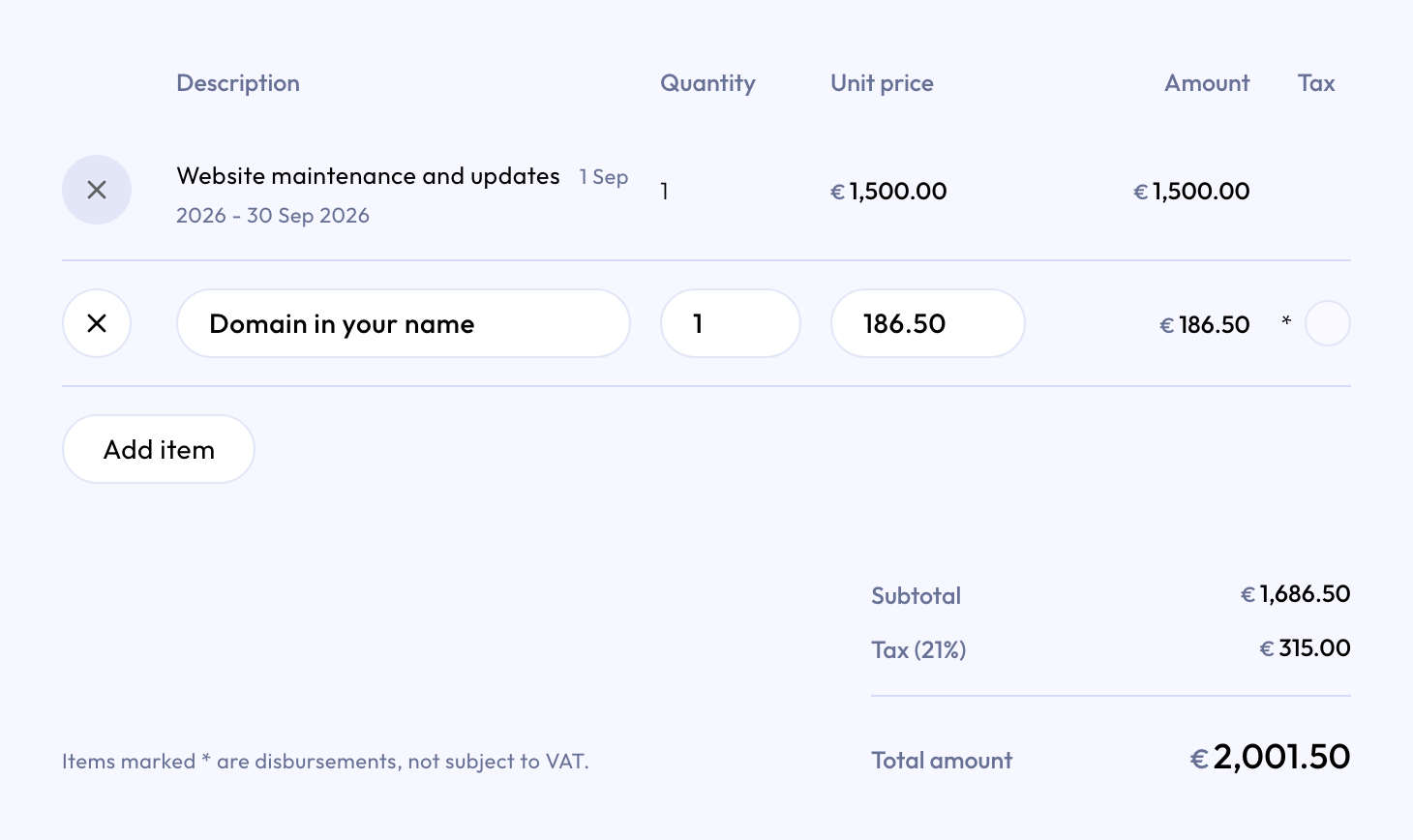
The invoice then marks that line with * and adds: "Items marked * are disbursements, not subject to VAT." The VAT is calculated over the other lines only.
Costs you simply buy for the job and include in your price, such as materials or travel, usually do carry VAT. Leave Taxable on for those. Not sure? Ask your accountant.
Sent invoices
Once an invoice is sent, its lines can't change. Forgot something? Add it to the next invoice, or correct the sent one. See Correct a sent invoice.